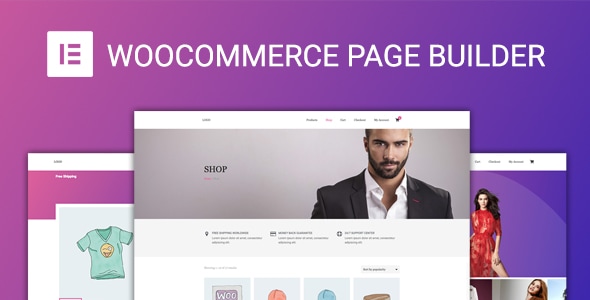
WooCommerce Page Builder For Elementor Add-ons is a WordPress plugin from DawnThemes that lets a store owner redesign every page in a WooCommerce shop using the Elementor drag-and-drop editor, without writing code. It targets freelancers, agencies and shop owners who want product, cart and checkout layouts that go beyond what a theme’s default templates allow. The extension is sold on CodeCanyon for $29 and has drawn 1,798 sales with a 4.86 average from 14 ratings.
The pitch is straightforward: WooCommerce controls how a store behaves, but its default templates are rigid. This add-on inserts a template layer between WooCommerce and the theme so that Elementor can take over the visual output of each store page. The vendor, DawnThemes, also publishes a live demo so buyers can inspect the builder before paying.
What the WooCommerce Page Builder For Elementor Add-ons actually lets a store owner build
The plugin’s core idea is template replacement. For each part of a shop, an administrator creates a layout in Elementor and assigns it a display condition. The plugin then swaps that layout in wherever the condition matches.
Coverage across the full purchase path
Templates can be built for the single product page, the shop archive, product category archives, product tag archives, the cart (including the empty-cart state), checkout, the order confirmation page and the My Account area. That is more coverage than most competing layout plugins offer, which often stop at the product page. A store can therefore carry one visual language from browsing through to the thank-you screen.
Conditional layouts instead of one-size-fits-all
A single default layout can serve every product, and separate layouts can be assigned by category or tag. The same logic applies to archives: one default archive layout plus category- and tag-specific overrides. In practice this means a furniture shop can give sofas a wide gallery layout while accessories keep a compact grid, all from the same dashboard.
WooCommerce shortcodes and widgets inside Elementor
The plugin ships a library of WooCommerce shortcodes and Elementor widgets, so elements such as the add-to-cart form, product tabs, related products and notices can be dropped into any layout. A custom hook widget is also included for injecting third-party output. Fonts and text styling are adjustable from within the builder, so typography does not have to be handled in a child theme.
Works with the free version of Elementor
The builder does not require Elementor Pro. That matters for budget-conscious projects, because the total cost of a custom store layout drops to the price of this plugin alone. It is also theme-agnostic, and the changelog shows fixes aimed at specific themes such as Savoy and Mihouse, which suggests the vendor actively tests against popular commercial themes.
Demo import and updates
A one-click demo import is included, along with automatic plugin updates once the purchase is registered. Documentation is hosted online. The vendor also lists compatibility with a long roster of WooCommerce extensions, including Subscriptions, Bookings, Composite Products, Memberships, Points and Rewards, Germanized, German Market, WC Vendors-style multivendor marketplaces, YITH Wishlist and Compare, and several Iconic plugins. Those claims are worth verifying on a staging site, since compatibility lists age quickly.
Where this WooCommerce Page Builder For Elementor Add-ons fits, and where it does not
The strongest fit is a store running a commercial theme whose product or checkout templates feel generic. Rather than paying a developer to override templates in a child theme, the site owner builds the replacement visually. Freelancers who deliver several shops a year will get repeated use out of the conditional layout system, and agencies can standardise a house style across client sites.
It also suits stores with genuinely varied catalogues. A shop selling both downloadable software and physical hardware rarely looks right under a single product template; category-based layouts solve that without custom PHP.
Multivendor marketplaces and subscription businesses are a reasonable fit given the declared compatibility, provided the specific integrations are tested before launch.
The wrong choice is a store that only needs cosmetic tweaks. If the existing theme already produces an acceptable product page and the goal is a different button colour or a rearranged gallery, Elementor’s own WooCommerce widgets combined with theme settings will do the job without another plugin in the stack. The same applies to stores that have deliberately standardised on Gutenberg blocks, since the vendor states the plugin is not Gutenberg-optimised. Very large catalogues with heavy caching and custom checkout logic should also approach with care, because each template layer is one more thing that can conflict with bespoke code.
Strengths and limitations of the WooCommerce Page Builder For Elementor Add-ons
Strengths
- Template coverage extends to cart, checkout, thank-you and account pages, not just products.
- Conditional display by category and tag allows differentiated layouts without duplicating work.
- No dependency on Elementor Pro, which keeps total project cost low.
- Theme-independent, with evidence in the changelog of testing against named commercial themes.
- Broad declared compatibility with subscription, booking, multilingual and multivendor extensions.
- Source files (PHP, JavaScript, CSS) are included, so developers can extend or audit the code.
Limitations
- The last update was December 2023. Elementor and WooCommerce both ship frequently, so buyers should confirm current compatibility rather than assume it.
- High-resolution asset support is marked as not included in the vendor specifications, which is a consideration for image-heavy stores on retina displays.
- No Gutenberg support, so the plugin is a dead end for block-based site builds.
- The compatibility list is vendor-declared; nothing in the listing states which versions of each extension were tested.
- Checkout templates are the riskiest surface to customise. Payment gateways and order-review logic can break in ways that only appear during a real transaction, so a full test order is mandatory.
- Only 14 ratings underpin the score, which is a small sample even though the average is high.
How it compares with the wider category of WooCommerce layout plugins
Most tools in this space fall into two groups. The first adds WooCommerce widgets to Elementor but leaves page structure to the theme. The second replaces whole templates. This plugin sits firmly in the second group, and its distinguishing feature is breadth: it covers the entire funnel rather than concentrating on the product page.
Against widget-only add-ons, it offers more control but also more responsibility, because a badly built checkout template is worse than a plain one. Against theme-bundled builders, it wins on portability: layouts survive a theme switch, which is valuable for agencies handing sites to clients. Against fully bespoke development, it trades some flexibility for speed and a price of $29.
The trade-off is maintenance. A template layer that sits between WooCommerce and the theme has to keep pace with both, and the update history shows a steady stream of compatibility fixes through 2020 and 2021 before slowing. Buyers should weigh that cadence against the low asking price.
Frequently Asked Questions
Does WooCommerce Page Builder For Elementor require Elementor Pro?
No. The vendor states the plugin works with the free version of Elementor, so the Pro licence is not needed to build or display custom WooCommerce templates. Sites that already own Elementor Pro can still use both together, but the page builder add-on does not depend on it.
Can it create different layouts for different product categories?
Yes. Layouts can be assigned by display condition, so a store can set one default product template and override it for specific categories or tags. Archive pages follow the same pattern, with a default shop layout plus category- and tag-specific versions. This allows varied catalogues to look intentional rather than uniform.
Is the plugin compatible with WooCommerce Subscriptions and Bookings?
The vendor lists both as compatible, along with Memberships, Composite Products, Points and Rewards and several multilingual and multivendor extensions. These are declared compatibilities rather than independently verified ones, so testing on a staging copy with the exact extension versions in use is the sensible step before going live.
Will custom cart and checkout templates break payments?
They can if the template omits required WooCommerce elements, which is why every layout should be tested with a real order. The plugin supplies WooCommerce widgets and shortcodes for cart tables, order review and notices, but the person building the template is responsible for including them in the correct order.
Verdict on the WooCommerce Page Builder For Elementor Add-ons
This is a sensible purchase for freelancers, agencies and store owners who want visual control over the whole WooCommerce funnel and are prepared to test each template before launch. The conditional layout system and the absence of an Elementor Pro requirement make it good value at $29, and the sales count suggests a settled user base. It is a poor fit for sites built on Gutenberg, for stores that only need minor theme tweaks, and for anyone who cannot accommodate a plugin whose most recent release dates from late 2023. Buyers should treat the compatibility list as a starting point for their own testing rather than a guarantee.