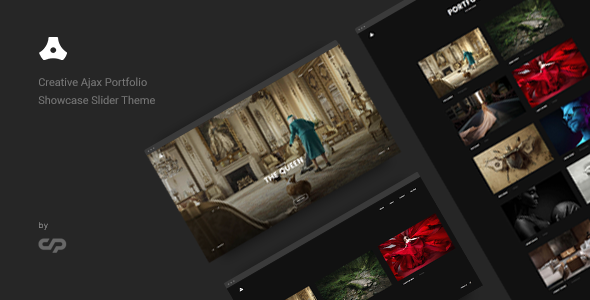
Satelite Creative is a WordPress theme sold on ThemeForest for $59, built by developer ClaPat for portfolio-driven sites that lean on large imagery and smooth movement between pages. Its defining trait is an Ajax layer that swaps page content without a full browser reload, paired with several slider and grid layouts for showing off visual work. It suits photographers, design studios and freelancers who want a gallery-first site without assembling a page builder stack from scratch.
The listing has accumulated 974 sales, which puts it in the established-but-not-blockbuster bracket for a creative theme. That number matters less than what the theme actually does, so the sections below break down its capabilities, the projects it fits, and the places where buyers should temper expectations.
What Satelite Creative Actually Does Well
The core proposition is presentation. Everything in the theme is organised around getting a visitor from a landing page into a body of work with as little friction as possible, and the feature set reflects that priority.
Ajax page transitions and the browsing experience
Ajax is a technique where the browser fetches new content in the background instead of reloading the whole page. In practice, clicking from a portfolio index into a single project swaps only the content area, so the header, menu and any playing media stay put. The result is a site that feels closer to a native app than a conventional WordPress install. ClaPat built the theme around this behaviour rather than bolting it on, and the changelog shows repeated fixes to the transition scripts, which suggests it is actively maintained rather than abandoned after launch.
Three showcase slider formats plus a Packery grid
Portfolio display is not a single template. The theme ships a fullscreen parallax slider, where background layers move at different speeds as the page scrolls, along with small and large carousel variants. There is also a Packery layout, a masonry-style grid that packs items of different sizes into a tight arrangement without gaps. Between them, these cover the common ways a photographer or studio might want to lead with work: one hero image at a time, a horizontal strip, or a dense wall of thumbnails. Category filters were added in version 1.8, so visitors can narrow a showcase by project type.
Theme options, typography and colour control
A dedicated options panel groups settings into general, header, footer, portfolio, blog, styling, typography, contact map and error page sections, with import and export for carrying a configuration between installs. Typography draws on the Google Fonts library of 600-plus typefaces, and the theme offers dark and light colour schemes as starting points. A shortcode generator provides a visual way to insert elements without writing markup. None of this is unusual in the premium theme market, but the breadth means a site can be styled without touching a child theme’s stylesheet.
Practical groundwork: speed, retina, translation and structure
The theme is coded to HTML5 and CSS3, declared retina-ready for high-density displays, and ships with 550-plus icons. WPML compatibility and included .po/.mo translation files mean a multilingual build is possible without fighting the templates. A child theme is supported, which matters for anyone planning custom modifications that should survive updates. One-click demo import is included, though the vendor is explicit that the demonstration images are licensed from Behance and are not part of the download — buyers supply their own photography.
Where Satelite Creative Fits, and Where It Does Not
The clearest fit is a visual portfolio where the work is the argument. A wedding or architecture photographer, an illustration studio, a motion designer or a small agency presenting case studies all benefit from the slider-first approach and the seamless transitions. Freelancers who want a polished personal site without a developer can use the demo import and options panel to get most of the way there in an afternoon.
It is also a reasonable choice for a creative business that wants a blog alongside its portfolio, since blog options and layout settings are part of the panel rather than an afterthought.
The wrong choice is a content-heavy site. A publication, a service business with long text pages, a membership site or an online store gains little from Ajax transitions and slider showcases, and would be paying for presentation machinery it will never use. Anyone who needs deep e-commerce, complex forms or custom post-type logic beyond portfolio items should look at a more general-purpose theme or a block-based setup instead. The theme’s own compatibility statement lists WordPress 5.1 and above, so sites running very recent block-editor workflows should confirm behaviour before committing.
Strengths and Limitations of This Portfolio Theme
Strengths
- Page transitions are the theme’s centrepiece, not a plugin add-on, so the browsing experience is consistent across templates.
- Multiple showcase formats — fullscreen parallax, two carousel sizes, Packery grid — let one theme serve different portfolio strategies.
- Category filtering on showcase, carousel and grid templates makes larger bodies of work navigable.
- WPML support and translation files make multilingual builds viable without template surgery.
- Child theme readiness and import/export of settings protect custom work across updates.
- An active changelog through 2024 shows the developer still patches the codebase.
Limitations
- Demo images are not included. The visuals that make the preview look impressive must be sourced and licensed separately, which adds cost and time.
- Ajax transitions can complicate analytics, anchor links and third-party scripts that expect a full page load; each integration needs testing.
- The feature set is oriented toward visual portfolios. Blog and business use cases are supported but not the design’s focus.
- The vendor does not state a page-builder integration, so layouts are controlled through the theme’s own options and shortcodes rather than a drag-and-drop editor.
- At $59 with 974 sales, support runs through a ticket system; buyers wanting guaranteed response times should check the vendor’s policy first.
How Satelite Creative Compares With Other Creative Themes
The creative theme category splits roughly into two camps. One camp is built around a page builder, offering maximum layout freedom at the cost of heavier pages and a steeper learning curve. The other is built around opinionated templates, where the design decisions are made and the buyer fills in content. Satelite Creative sits firmly in the second camp, and its differentiator within that camp is the Ajax transition layer.
Against builder-based themes, it trades flexibility for coherence: pages will look consistent and load smoothly, but a buyer who wants to invent a novel layout will hit the limits of the provided templates. Against plainer portfolio themes, it offers more slider variety and a more deliberate browsing feel, at the cost of more moving parts to test. The honest framing is that this is a specialist tool. If the site’s job is to display images beautifully and move between them elegantly, it competes well. If the site’s job is anything else, a general-purpose theme will usually be the safer purchase.
Frequently Asked Questions
Does Satelite Creative require any plugins to work?
Yes, the theme relies on a bundled functionality plugin and a Gutenberg blocks plugin, both installed through the standard activation prompt. The changelog shows these plugins being updated alongside the theme, so they should be kept current. WPML is optional and only needed for multilingual sites.
Can Satelite Creative be used for a photography website?
Yes, it is designed for exactly that kind of work. The fullscreen parallax slider, carousel formats and Packery grid all prioritise large imagery, and the retina-ready coding keeps photos sharp on high-density screens. Buyers must supply their own photographs, since the demo images are licensed from Behance and excluded from the download.
Is the Ajax page transition optional?
Yes, it can be switched off in the theme settings. The changelog references a fix for the back-to-top button when transitions are disabled, which confirms the option exists. Turning it off restores conventional page loads, which is useful when third-party scripts or analytics tools misbehave.
How many fonts and icons come with the theme?
The theme provides access to more than 600 Google Fonts and ships with over 550 retina-ready icons. Both are managed through the options panel and shortcode generator, so changes can be made without editing code. The vendor does not state whether the icon set is a custom library or a third-party pack.
Final Verdict on Satelite Creative
Satelite Creative is a well-executed specialist theme for image-led portfolios, and the 974 sales alongside an active update history through October 2024 suggest a product that has found its audience and been maintained. Photographers, studios and creative freelancers who want smooth transitions and strong showcase layouts should shortlist it. Buyers who need a page builder, an online store or a site built around long-form text should not — the theme’s strengths would go unused and its constraints would become the story. At $59 the price is standard for the category, and the main hidden cost is sourcing demo-quality imagery of one’s own.