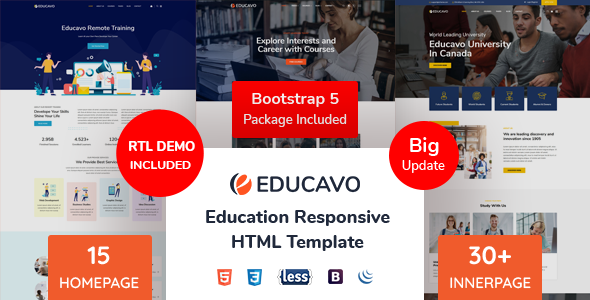
Educavo Business is a static HTML template built for education-sector websites, sold on ThemeForest by the developer rs-theme for $21. It provides a set of pre-built pages — homepages, course listings, teacher profiles, events and a shop — that a developer can edit and host on any web server, and it suits freelancers and small agencies building brochure or course-catalogue sites for schools, training providers and institutes who do not need a content management system.
The product has been downloaded 974 times on ThemeForest, and the vendor last updated it in November 2021. That date matters more than the sales figure for anyone evaluating it now, and it shapes most of the observations below.
What Educavo Business Actually Ships With
The package is a folder of HTML files, stylesheets, JavaScript and assets rather than a WordPress theme or a site builder project. That distinction drives everything else: the buyer gets source files to customise in a code editor and upload via FTP or a hosting control panel. There is no admin dashboard, no database and no plugin ecosystem.
The vendor lists twelve homepage layouts, though the changelog suggests the count grew over time — the initial 2020 release shipped five, with further homepages added in later versions. Thirty-plus inner pages cover the usual institutional ground: about pages, course archives, course detail pages, teacher grids and teacher bios, a single event style with a detail page, galleries, blog templates and a shop page. Five course templates and two teacher styles give some variety in how a catalogue can be presented.
Several capabilities are worth translating into practical terms:
- Bootstrap-based layout. The template started on Bootstrap 4 and a Bootstrap 5 demo was added in August 2021. In practice this means anyone familiar with Bootstrap’s grid and utility classes can restyle pages quickly, and the responsive behaviour is inherited from a framework rather than hand-rolled.
- Course and event detail pages. Rather than a single generic inner page, there are dedicated layouts for course descriptions and event listings. For a training provider, this saves the work of designing the two page types that carry the most content.
- Working contact and subscription forms. The forms are marked up and styled, but a static HTML file cannot process a submission on its own. The buyer still needs to connect a form handler or third-party service; the vendor does not state which one.
- W3C-valid markup and cross-browser support. These are claims from the listing rather than independently verified here, but valid markup generally means fewer rendering surprises and a cleaner base for later edits.
- Icon and font libraries. Font Awesome (the listing cites 630+ icons) and Google Fonts are bundled or linked, so common education iconography — books, calendars, graduation caps — is available without sourcing assets.
One practical note the listing is explicit about: the preview images are licensed from stock sites for demonstration only and are not included in the purchase files. A buyer will need to supply their own photography, which for a school or institute usually means a photo shoot or a stock subscription.
Where Educavo Business Fits and Where It Does Not
The strongest fit is a small institution or independent training business that needs a polished, fast, mostly static web presence: a kindergarten, a tutoring centre, a workshop provider, a course hub or a department within a larger college. A freelancer quoting a fixed-price build benefits most, because the design decisions are already made and the remaining work is content, branding and forms.
A second good fit is a prototype. Agencies pitching to education clients can assemble a convincing multi-page mockup in an afternoon and use it in a proposal before committing to a CMS build.
The template is the wrong choice in several common situations. Any organisation that expects non-technical staff to publish courses, news or events weekly should be looking at a CMS-driven theme instead — every content change here means editing HTML. Sites that need student logins, enrolment workflows, payment processing or a learning management system are outside the scope entirely; the shop page is a layout, not a store. And a project with strict accessibility or performance budgets should treat the template as a starting point only, since neither is addressed in the vendor’s feature list.
Strengths and Limitations of This Education Template
The honest assessment splits cleanly between what the package does well and what a 2021 build date implies.
Strengths
- Broad page coverage for the education niche — courses, teachers, events, gallery, blog and shop — in one purchase, which reduces design time considerably.
- Bootstrap foundation makes restyling predictable for anyone with front-end experience.
- Low price relative to the number of layouts included.
- Organised file structure and documentation, according to the vendor, which shortens onboarding.
- Twelve homepage variants allow a client to choose a tone — from kindergarten to professional training — without new design work.
Limitations
- The last update was November 2021. Bootstrap 5 has moved on since then, and dependencies such as Font Awesome and any bundled JavaScript libraries are likely behind current releases. Buyers should expect to audit and update them.
- No content management. Every course, event and blog post is a hand-edited HTML file, which does not scale past a handful of pages maintained by one person.
- The forms require an external handler that the vendor does not specify, so “working contact form” means styled markup, not a functioning mail pipeline.
- No accessibility or performance claims are made. Semantic structure and image weight would need checking on any real build.
- Preview images are not licensed for use, so the visual result depends entirely on assets the buyer supplies.
How It Compares With Other Education Website Options
The realistic alternatives fall into three groups. The first is a WordPress education theme, which costs more but brings a dashboard, plugins and content editing for non-developers. The second is a general-purpose site builder such as Elementor or Webflow, which offers more flexibility but requires the buyer to design each page type from scratch. The third is a custom build, which is the most expensive and the most tailored.
Educavo Business competes on speed and cost against all three. It cannot match a CMS theme for ongoing content operations, and it cannot match a site builder for flexibility. What it does offer is a complete set of education-specific layouts at a price below most single-page design jobs, with no subscription and no platform lock-in — the files are yours to host anywhere. For a one-off brochure site with a fixed course catalogue, that trade is sensible. For anything that will grow, the lack of a CMS becomes the deciding factor against it.
Frequently Asked Questions
Is Educavo Business a WordPress theme?
No. It is a static HTML5 and Bootstrap template delivered as editable files, not a WordPress theme. It will not install through a WordPress dashboard and does not connect to a database. Converting it to WordPress would require a developer to build a theme around the markup, which adds significant cost to the $21 purchase price.
Can the contact form send emails without extra setup?
No. The form is styled HTML markup, and static files cannot process submissions by themselves. The buyer must connect it to a server-side script, a form service or their host’s mail handler. The vendor’s listing does not name a recommended service, so this is a decision the developer makes during the build.
Are the images in the live preview included?
No. The listing states plainly that preview images come from stock sources and are for demonstration only. They are excluded from the purchase files. Anyone buying the template should budget for their own photography or a stock image licence, which for an education site usually means campus, classroom and student imagery.
Is the template still maintained?
The most recent version listed by the vendor is from November 2021, so updates have not continued recently. The template remains usable, but its Bootstrap, icon font and script dependencies are dated. Buyers should plan to review and update third-party libraries themselves rather than expecting current releases in the package.
Verdict: Who Should Buy Educavo Business
Buy it if the job is a fixed-scope, mostly static website for a school, training provider or course business, and there is front-end skill on hand to rebrand it and wire up forms. The breadth of education-specific layouts — courses, teachers, events, shop — is genuinely useful at this price, and the 974 sales suggest it has been a workable base for others. Do not buy it if staff need to publish content regularly, if enrolment or payment logic is required, or if the project demands current dependencies and verified accessibility out of the box. Treat the 2021 update date as a maintenance task rather than a disqualifier, and budget for imagery and form handling on top of the purchase price.