Ajax Full Featured Calendar 2 Calendars is a PHP and JavaScript calendar script sold on CodeCanyon for $18. It gives a website its own event calendar — with add, edit, delete, drag-and-drop rescheduling, recurring events, custom fields and categories — backed by a MySQL database rather than a third-party embed. It is aimed at freelancers and small agencies building scheduling into a client site, and at site owners who want calendar control without a monthly subscription.
The item has been bought 1,777 times and holds a 4.15 out of 5 rating across 41 reviews, which is a solid but not flawless record for a script in this price bracket. It is developed by pauloreg and was last updated in March 2024.
What the Ajax Full Featured Calendar 2 Calendars script actually does
The product is best understood as a wrapper around FullCalendar, the widely used jQuery plugin that renders calendar grids. FullCalendar on its own is a front-end display tool; it needs a server to store and serve events. This script supplies that layer: a PHP class and a jQuery plugin that read events from a MySQL table, hand them to the calendar, and write changes back.
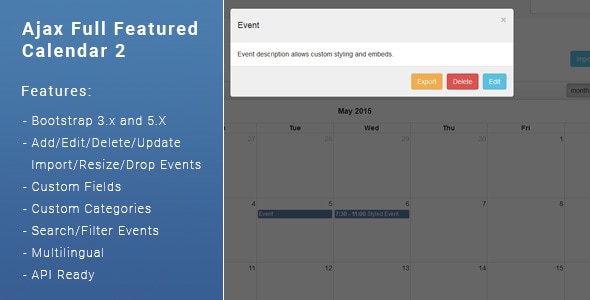
The practical consequence is that dragging an event to a new day or resizing it to change its duration saves the change immediately, with no page reload and no separate save step. Clicking an event opens its details, from which it can be edited, exported or deleted. That round trip is the core of the product, and everything else extends it.
Scheduling features that go beyond a basic grid
Events can repeat daily, weekly or monthly. Recurring events carry the usual complication — what happens when one instance of a series needs to change — and the script handles it with a choice: apply an edit or deletion to the current occurrence only, or to the whole series. Anyone who has managed a weekly meeting that moves once will recognise why that matters.
Week start day is configurable, and weekends can be hidden entirely, which suits business calendars that do not operate on Saturdays and Sundays. Events can also be imported, and the calendar or individual events can be exported to iCalendar (.ics) format for use in Outlook, Apple Calendar or Google Calendar.
Custom fields, categories and search
Beyond the standard title, date and description, the script supports custom fields, so an event can carry whatever data the project needs — a room number, a practitioner name, an order reference. A custom fields builder is included for defining them. Events can be sorted into categories created by the site owner, filtered by category, and searched. The vendor’s own examples are a dentist and a cake maker taking orders, which illustrates the range: the fields are meant to be shaped to the business, not used as supplied.
Two integration routes and a broad embed list
Google Calendar can be connected in view-only mode alongside the local calendar, so a business can display its existing Google schedule while managing new events locally. Google Maps is available for event locations. Event descriptions accept auto-embedded media from YouTube, Vimeo, Dailymotion, Soundcloud, Slideshare, Facebook and Giphy, and custom styling is applied through shortcode-like tags the vendor calls BB codes.
The script is API-ready, UTF-8 ready (so non-Latin text and accented characters store correctly), and supports multiple languages. A one-click installer and documentation are bundled, and the source JavaScript, CSS, PHP and SQL files are all included — a meaningful detail, since it means the code can be modified rather than only configured.
Editions, licensing and where this calendar fits
The purchase is not a single download but a set of editions, and choosing correctly matters more than any individual feature. The Developer Edition comes in four variants: a Simple version with no login where the public can add and view events, and three admin panel versions that differ in who sees what. One shares all events among logged-in users, one allows public viewing with logged-in management, and one keeps each user’s events private.
The Standard Edition is the end-user product: a Personal version where each logged-in user’s events are private, and a Company version where every logged-in user sees the shared calendar regardless of who created an event. The Developer Edition is the right pick for someone integrating the calendar into an existing application; the Standard Edition suits a site owner who wants a working calendar with logins out of the box.
Projects where it is a good fit
- Small business booking and scheduling pages — a clinic, salon, studio or hotel that needs a calendar on its own domain with fields tailored to its services.
- Agency client work — a freelancer or small agency adding scheduling to a client site without licensing a SaaS calendar at a recurring cost.
- Internal team calendars — the Company edition covers a shared schedule behind a login, which is enough for many small organisations.
- Admin themes and dashboards — the vendor positions it as a way to make the static FullCalendar demos common in admin templates actually functional.
- Custom applications — the Simple edition and the included PHP class give a developer a base to build on rather than a finished product to accept.
Where it is the wrong choice
This is not a booking engine. There is no payment processing, no availability logic, no deposit handling and no automated confirmation emails described in the listing. A business that needs customers to book and pay for appointments should look at dedicated booking software and treat this as a display layer at most. Similarly, anyone wanting two-way Google Calendar sync should note that the integration is view-only in one direction; events created here are not written back to Google. And a site already committed to a modern JavaScript framework will find a jQuery plugin and a PHP class an awkward fit next to its existing stack.
Strengths and limitations of Ajax Full Featured Calendar 2 Calendars
Strengths
- Genuine database-backed persistence behind the calendar, not a static display — drag, resize and edit all save to MySQL.
- Recurring event handling with per-occurrence and whole-series edit options, which many cheap calendar scripts skip.
- Custom fields and categories make the calendar adaptable to a specific business rather than generic.
- Source files for every layer — JavaScript, CSS, PHP and SQL — are included, so the code is modifiable.
- iCalendar export, event import and view-only Google Calendar connection cover the common interoperability needs.
- Multiple editions with clear permission models, from public event submission to private per-user calendars.
- Established sales history and a rating above four stars, with a low one-off price and no subscription.
Limitations
- The browser compatibility list includes Internet Explorer 8 through 11, which signals an ageing codebase; the vendor does not state a modern browser support policy beyond that list.
- Bootstrap 3 support has been dropped and only Bootstrap 5 is current, so sites on older Bootstrap versions face rework or a support request.
- Google Calendar integration is view-only; there is no two-way sync, which rules it out for teams that treat Google as the source of truth.
- No payment, invoicing or availability-checking features, so it cannot serve as a booking system on its own.
- There is no stated limit on concurrent users or events, and no performance guidance for large calendars — a gap worth testing before committing a high-traffic site.
- The edition structure is genuinely confusing on first read, and buying the wrong variant means either a refund request or unnecessary customisation.
How it compares with the wider calendar script category
Calendar scripts on marketplaces fall into three rough groups. The first is thin front-end wrappers that style FullCalendar but leave storage to the buyer; those are cheaper in effort only if the buyer already has a backend. The second is full booking systems with payments and availability rules, which cost more and impose their own workflow. This product sits deliberately between them: it owns the storage and the editing experience but stops short of commerce.
Against the first group, the advantage is completeness — a working PHP class, a database schema, an installer and documented editions. Against the second, the advantage is flexibility and price: $18 buys a calendar that can be reshaped through custom fields rather than a booking product that must be worked around. Against hosted SaaS calendars, the trade-off is control versus convenience; self-hosting means no recurring fee and full data ownership, but also responsibility for updates, backups and security patches. Buyers comparing on capability should weigh the recurring-event handling and custom fields, which are the two areas where budget calendar scripts most often fall short.
Frequently Asked Questions
Does Ajax Full Featured Calendar 2 require coding knowledge to install?
No coding is required for the Standard Edition, which ships with a one-click installer and documentation. Setting up the database and choosing an edition are the main steps. Customising fields, styling or integrating the Developer Edition into an existing application does call for PHP and JavaScript familiarity, since the product is delivered as source files rather than a hosted service.
Can it sync events both ways with Google Calendar?
No, the Google Calendar connection is view-only. Events from a Google calendar can be displayed alongside the local calendar, but events created or edited in the script are not written back to Google. For two-way sync, a different integration or custom development against the Google Calendar API would be needed, and the script is described as API-ready for that kind of work.
What is the difference between the Developer Edition and the Standard Edition?
The Developer Edition is built for integration, offering a Simple no-login version plus three admin panel variants with different sharing rules. The Standard Edition is the finished end-user product, with Personal (private per-user events) and Company (shared events for all logged-in users) versions. Buyers wanting to embed the calendar in their own application should choose Developer; site owners wanting a ready calendar should choose Standard.
Does it handle recurring events that change one week only?
Yes. Recurring events can be set to repeat daily, weekly or monthly, and when editing or deleting an occurrence the script offers a choice between applying the change to only the current event or to all events in the series. That covers the common case of a regular meeting that moves once without disrupting the rest of the schedule.
Verdict: who should buy Ajax Full Featured Calendar 2 Calendars
This is a sensible purchase for a freelancer, small agency or site owner who needs a self-hosted calendar with real database storage, recurring events and custom fields, and who is comfortable with a PHP and jQuery stack. The $18 price, the included source files and the 1,777 sales with a 4.15 rating make it a low-risk experiment for that audience. It is a poor fit for anyone needing payments, availability logic or two-way Google sync, and for teams building on a modern JavaScript framework where a jQuery plugin will feel out of place. Buyers should also confirm which edition they need before purchase, because the variant structure is the most likely source of disappointment. Those on legacy Bootstrap or expecting frequent updates should check the demo and recent support activity first.